Garage Door Repair Hugo MN › Guides › Reverses Before Closing
Garage Door Reverses Before Closing: Causes to Check, in Order
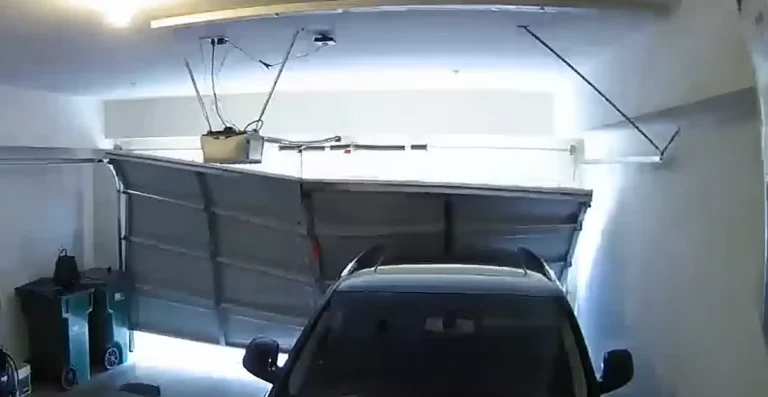
When a garage door goes down and then back up, the opener is following a safety rule, and something is telling it the door is blocked, too heavy or already at the floor. Check the sensors and the path first, then the down travel setting, then close force and door balance. A failed opener is the rare answer.
Reverses at the floor usually down travel
Reverses mid-way path, sensors or binding
Never raise close force to fix it
Sourced Chamberlain and CPSC
Why does my garage door go down and then back up?
Reversing is the safety system working. The opener is built to turn the door around whenever it thinks the door has hit something.
The federal safety standard for residential garage door operators, 16 CFR Part 1211 from the Consumer Product Safety Commission, requires a door that contacts an obstruction to stop and reverse within 2 seconds. Chamberlain’s support documentation describes the same behavior: if the door touches an obstruction on the way down, it reverses, the opener beeps and the lights flash five times.
So a door that reverses is rarely a broken opener. It usually means the opener believes one of three things: something is in the way, the door is harder to move than it should be, or the door has already reached the floor. The checks below take those three ideas in order.
What does each reversing symptom usually mean?
| What you see | Common cause | Start with |
|---|---|---|
| Reverses the moment it touches the floor | Down travel set too far, so the floor reads as an obstruction | Down travel setting |
| Reverses partway down, opener beeps and lights flash 5 times | Something in the path, or a sticking or binding door | Clear the path, then the tracks and rollers |
| Reverses partway down and a sensor light is dark or blinking | Misaligned or blocked safety sensors | Sensor lenses and alignment |
| Reverses at the same spot every cycle | A fixed point of binding, or an out-of-balance door | Lift the door by hand with the opener disconnected |
| Reverses after the last adjustment | Travel or force limits changed | Undo the change, then re-test |
The obstruction pattern (reverse, beep, five flashes) comes from Chamberlain’s documentation, so it applies to Chamberlain and LiftMaster openers. Other brands use their own codes, and our guide to opener blink and beep codes covers Genie and Craftsman too.
Which causes should I check first?
Work through these in order. The list follows the same sequence Chamberlain’s own troubleshooting article uses, starting with the cheapest and safest checks.
1. Is something blocking the door or the sensor beam?
Chamberlain tells owners to confirm the safety sensors are aligned before doing anything else, because misaligned sensors are a common reason a door will not close. Look for anything on the floor under the door, a stored item leaning on the track, or ice and packed snow along the bottom edge. Then check the two sensors near the floor: wipe both lenses and confirm each sensor LED glows steady. Genie says its Safe-T-Beam lenses should be mounted five to six inches from the floor on either side of the opening and facing each other. Our sensor repair page goes further into alignment and replacement.
2. Is the door hitting the floor and reversing?
If the door reverses right as it touches down, Chamberlain lists three reasons: the down travel needs to be decreased, the door itself has a problem, or the logic board has failed, which it calls rare. Travel limits control how far the door goes before the opener stops, and setting them too far tells the opener the door is stuck.
Adjusting travel differs by opener age. Chamberlain says models made before about 2011 use adjustment screws on the sides of the opener, and later models use UP and DOWN arrow buttons near the antenna. After decreasing down travel, run several full cycles and test the safety reversal again. Your opener’s manual has the exact steps for your model.
3. Is the door heavy, sticking or binding?
Chamberlain reports that on Security+ 2.0 openers, four UP arrow flashes followed by one DOWN arrow flash means the opener detected an obstruction, binding or a sticking door, and an LCD model reads "excessive closing force detected." On other models the Learn button flashes five times every ten seconds. Genie’s diagnostics have a similar entry: four blinks means incorrect force settings.
Chamberlain also recommends testing the balance of the door before changing limits or force, because the door has to be balanced for those settings to work and for the door to pass the reversal test. A door that is out of balance, has worn rollers, or is rubbing in a bent track makes the opener work harder, and the opener responds by reversing. Balance depends on the springs and cables, which are under high tension. Do not adjust them yourself; read our garage door safety guide and the DIY versus pro guide first, and if the door feels heavy or uneven, see spring repair, cable repair or track repair.
4. Should I turn up the close force?
No. Chamberlain is explicit: never raise the force beyond the minimum needed to close the door, and never use force adjustments to make up for a binding or sticking door. Too much force interferes with the safety reversal system, which is the system that protects people and pets. If more force seems to fix the reversing, the door probably has a mechanical problem that needs finding.
Chamberlain adds that adjusting one control, travel or force, can mean the other needs adjusting too, and that a wrong travel setting also interferes with safe reversal.
5. Could the opener itself be the problem?
It can, but Chamberlain describes a failed logic board as a rare cause of reversal. If you have cleared the path, aligned the sensors, set the down travel correctly and confirmed the door moves freely by hand, the remaining suspects are the logic board or force sensing. That is the point to call for a diagnosis, described on our opener repair page.
How do I test that the door still reverses safely?
After any change to travel, force or sensors, test the safety reversal. Chamberlain says the door must reverse when it contacts a 1-1/2 inch object, or a 2×4 laid flat, on the floor, and that the test should be repeated every month. If the door does not reverse on the test object, stop using the opener and have it inspected before the door is used again.
The full test procedure, including the photo-eye check, lives in our safety guide. If the door is stuck partly closed and you need to get it open, follow how to open a garage door manually. For the opposite symptom, a door that will not close at all, start with garage door won’t close.
Reversing questions
Why does my garage door reverse as soon as it touches the floor?
Chamberlain lists three reasons: the down travel needs to be decreased, the door has a problem, or the logic board is failing, which it calls rare. Down travel is the first thing to adjust, followed by a full safety reversal test.
Why does my garage door reverse a few feet before it closes?
The opener has usually detected an obstruction, a blocked sensor beam or extra resistance. Clear the path and check the sensors first. If the opener flashes five times and beeps, that is the obstruction signal on Chamberlain and LiftMaster openers, and the door is binding or something is in the way.
Can I turn up the close force to stop it from reversing?
No. Chamberlain warns against raising force beyond the minimum needed to close the door and against using force to compensate for a sticking door. More force weakens the safety reversal system.
Is a reversing garage door dangerous?
The reversing itself is the safety feature. The risk is a door that does not reverse when it should, which is why the reversal test matters after any adjustment and once a month.
Does reversing mean my opener needs replacing?
Usually not. Chamberlain describes a bad logic board as a rare cause. Most reversing traces back to sensors, travel limits, force or a door that is binding or out of balance, all of which can be fixed without a new opener.
Sources
- Chamberlain Group, my garage door will not fully close
- Chamberlain Group, the garage door comes down, hits the floor and reverses
- eCFR, 16 CFR 1211.13, secondary door sensors (CPSC)
- The Genie Company, Excelerator series self-diagnostic troubleshooting
- The Genie Company, why does my Genie opener reverse and open when I try closing it
Genie’s support pages are blocked to automated readers, so the Genie sensor-mounting detail comes from a search excerpt of its support answer and the blink code from its store troubleshooting page. Genie and Craftsman limit and force adjustment steps were not verified for this guide; use your model’s manual. The obstruction flash pattern and the 2×4 test come from Chamberlain and apply to Chamberlain and LiftMaster openers. This guide is general information, not a substitute for your opener’s manual. Sources were read in September 2026.
Door still reversing after these checks?
If the path is clear, the sensors glow steady and the down travel is set correctly and the door still turns around, the cause is usually binding, balance or a control problem that is faster to diagnose in person.
What to have ready
- Where in the travel the door reverses: at the floor, or partway down
- Whether the opener beeps or flashes when it reverses, and how many times
- Your opener’s brand and model number, if visible on the motor unit
- Whether the door moves smoothly by hand with the opener disconnected